

How to Implement an AI Chatbot on Your Website (Step-by-Step Guide)
Website visitors expect immediate answers to their questions, and businesses that fail to provide instant support risk losing potential customers to competitors. Traditional contact forms and email support create friction in the customer journey, while live chat requires constant staffing. AI chatbots bridge this gap by providing instant, intelligent responses twenty-four hours a day without requiring human intervention.
Implementing an AI chatbot on your website might seem technically complex, but modern platforms have simplified the process dramatically. This comprehensive guide walks you through every step of adding an intelligent chatbot to your website, from selecting the right platform to optimizing performance based on real user interactions.
Understanding AI Chatbots vs. Traditional Chat Widgets
Before diving into implementation, it is important to understand what distinguishes AI chatbots from simpler chat widgets. Traditional chat widgets simply provide an interface for human agents to communicate with website visitors. When no agents are available, these widgets either show an offline message or collect contact information for later follow-up.
AI chatbots, in contrast, use artificial intelligence to understand visitor questions and provide relevant answers automatically. They can access your website content, product information, knowledge base articles, and other data sources to deliver accurate responses without human involvement. Modern AI chatbots understand natural language, maintain conversation context, and can handle complex multi-turn conversations.
The most sophisticated AI chatbots combine automated responses with seamless handoff to human agents when needed. This hybrid approach ensures that simple questions receive instant answers while complex issues get appropriate human attention. The AI chatbot handles the majority of inquiries automatically, dramatically reducing the workload on your support team.
Step 1: Define Your Chatbot's Purpose and Scope
Successful chatbot implementation begins with clarity about what you want the chatbot to accomplish. Different use cases require different capabilities, training data, and integration requirements. Start by identifying the primary purpose your chatbot will serve.
Customer support chatbots focus on answering product questions, troubleshooting issues, and directing users to relevant help resources. These chatbots need access to your knowledge base, documentation, and common support scenarios. They should be able to understand technical questions and provide accurate, helpful answers.
Lead generation chatbots engage visitors, qualify prospects, and collect contact information. These chatbots ask strategic questions to understand visitor needs, determine if they match your ideal customer profile, and capture information for your sales team. They focus on conversational engagement rather than pure information delivery.
Sales assistance chatbots help visitors navigate your products or services, compare options, and make purchase decisions. These chatbots need detailed product knowledge, pricing information, and the ability to guide users through selection criteria. They may also handle basic transactions like adding items to carts or processing orders.
Appointment scheduling chatbots check availability, book appointments, send confirmations, and handle rescheduling requests. These chatbots integrate with calendar systems and need clear logic for handling scheduling constraints, time zones, and booking policies.
Most businesses benefit from chatbots that combine multiple purposes. A well-designed chatbot might answer support questions, qualify leads, and schedule demos all within the same conversation. However, starting with a clear primary purpose helps focus your implementation efforts and measure success.
Step 2: Choose the Right AI Chatbot Platform
The chatbot platform you select significantly impacts implementation complexity, capabilities, and long-term success. Several factors should guide your platform selection decision.
Ease of implementation varies dramatically across platforms. Some require extensive coding and technical expertise, while others offer visual builders and pre-built templates. Consider your team's technical capabilities and how quickly you need to launch. Platforms like Jaano.ai offer simple implementation that requires only adding a code snippet to your website, while custom-built solutions demand significant development resources.
AI capabilities determine how well your chatbot understands and responds to user questions. Look for platforms that use advanced natural language processing, can learn from your specific content, and improve over time based on actual conversations. The quality of AI directly impacts user satisfaction and the percentage of questions your chatbot can handle without human intervention.
Integration options affect how well your chatbot connects with your existing business systems. Essential integrations include your customer relationship management system, help desk software, email marketing platform, and analytics tools. Platforms with robust APIs and pre-built integrations simplify connecting your chatbot to your broader technology stack.
Customization flexibility allows you to match the chatbot to your brand and specific business needs. This includes visual customization like colors, fonts, and positioning, as well as functional customization like conversation flows, response logic, and escalation rules. Some platforms offer extensive customization while others provide limited options.
Pricing models range from free tiers with basic features to enterprise plans with advanced capabilities. Consider both current needs and future growth. Pay attention to how pricing scales with usage, whether there are limits on conversations or visitors, and what features are included at different price points.
Step 3: Prepare Your Knowledge Base
The quality of your chatbot's responses depends heavily on the knowledge base it can access. Before implementation, organize and prepare the information your chatbot will need to answer visitor questions effectively.
Start by compiling your frequently asked questions and their answers. Review support tickets, email inquiries, and live chat transcripts to identify the questions visitors ask most often. Document clear, concise answers to each question. These FAQs form the foundation of your chatbot's knowledge.
Organize your product or service information in a structured format. This includes features, benefits, pricing, specifications, use cases, and comparison information. The more comprehensive and well-organized this information, the better your chatbot can help visitors understand your offerings.
Create or update your help documentation to ensure it is current and comprehensive. Many AI chatbots can scan your existing help center or documentation and use that content to answer questions. However, the quality of those answers depends on the quality of your documentation. Well-written, clearly organized help articles enable better chatbot responses.
Document your business processes and policies that the chatbot needs to know. This includes return policies, shipping information, service level agreements, pricing policies, and any other information visitors might ask about. Having this documented ensures consistent, accurate responses.
Consider creating conversation flows for common scenarios. While AI chatbots can handle open-ended conversations, defining structured flows for specific use cases like lead qualification or appointment scheduling ensures these critical interactions follow your preferred path.
Step 4: Install the Chatbot on Your Website
Once you have selected a platform and prepared your knowledge base, the technical implementation process begins. Most modern chatbot platforms make this remarkably simple.
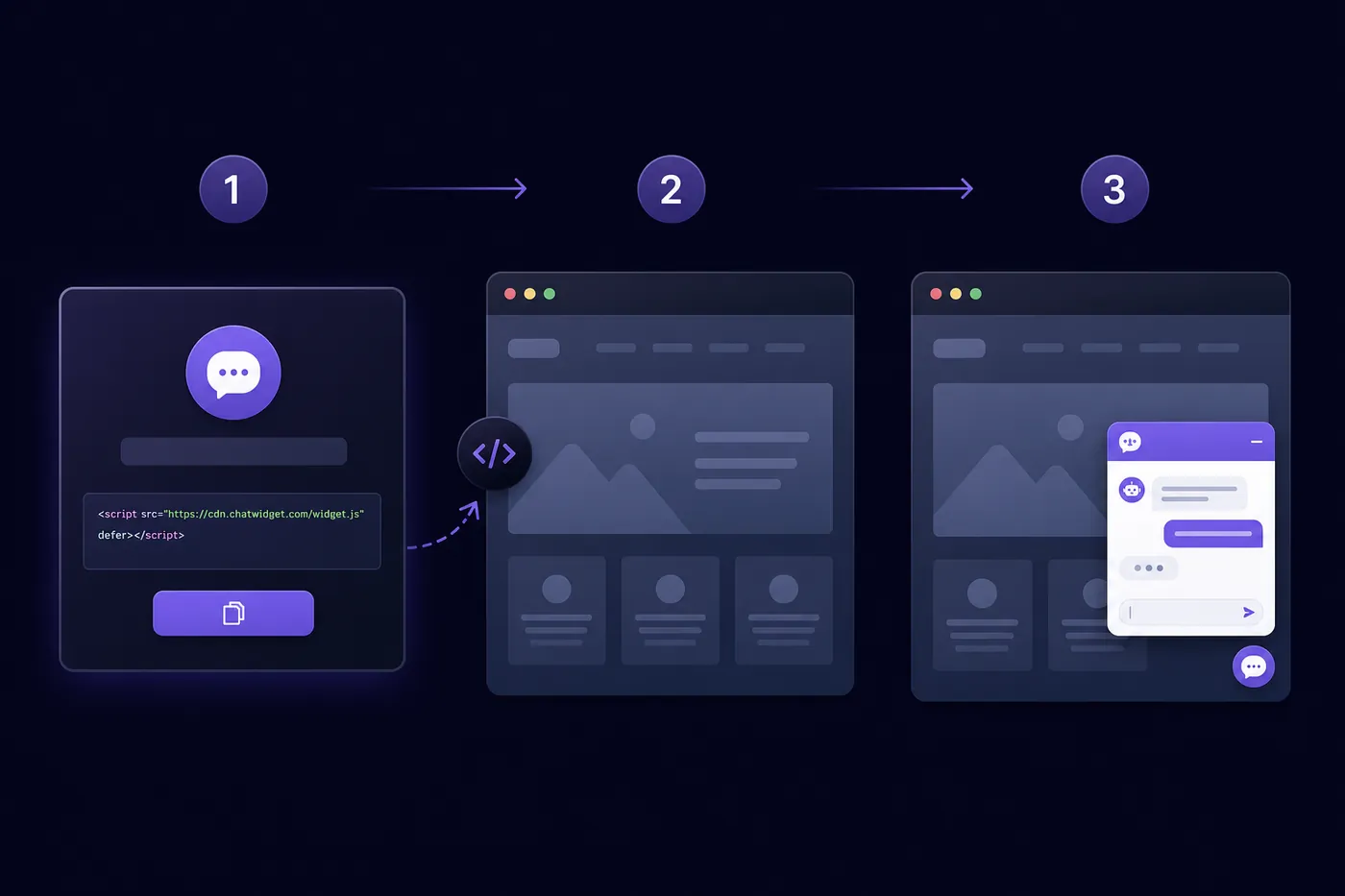
The typical installation process involves adding a small JavaScript code snippet to your website. This snippet loads the chatbot interface and connects it to the platform's servers. For most platforms, you simply copy the provided code and paste it into your website's HTML, usually just before the closing body tag.
If you use a content management system like WordPress, Shopify, or Wix, many chatbot platforms offer dedicated plugins or apps that eliminate the need to edit code directly. These plugins typically involve installing the extension and entering your chatbot account credentials or API key.
For custom websites or those built on frameworks like React, Vue, or Angular, chatbot platforms usually provide specific integration instructions and libraries. These may involve using npm packages or following framework-specific implementation patterns.
After adding the code, verify that the chatbot appears correctly on your website. Check multiple pages to ensure consistent behavior, test on different devices and browsers, and confirm that the chatbot loads quickly without impacting page performance.
Configure the chatbot's appearance to match your brand. This includes selecting colors that align with your website design, choosing an appropriate position (typically bottom-right corner), setting the size of the chat window, and customizing the welcome message that greets visitors.
Step 5: Train Your AI Chatbot
Training your AI chatbot ensures it understands your specific business context and can provide accurate, helpful responses. The training process varies by platform but generally involves several key activities.
Upload or connect your knowledge base content. Most platforms allow you to import FAQs, link to your help center, upload documents, or connect to your existing knowledge management system. The AI analyzes this content to understand what information is available and how to retrieve relevant answers.
Define conversation intents and entities. Intents represent what users are trying to accomplish, like checking order status or asking about pricing. Entities are specific pieces of information within questions, like product names or order numbers. Training the AI to recognize these patterns improves its ability to understand and respond appropriately.
Create sample conversations that demonstrate how the chatbot should handle different scenarios. Many platforms allow you to provide example questions and desired responses. The AI learns from these examples and generalizes to handle similar questions phrased differently.
Set up escalation rules that define when the chatbot should transfer conversations to human agents. This might be based on specific keywords, question types, customer frustration indicators, or explicit requests to speak with a person. Clear escalation rules ensure customers get human help when they need it.
Configure integrations with your business systems so the chatbot can access real-time information. This might include connecting to your CRM to look up customer information, integrating with your order management system to check order status, or linking to your calendar for appointment scheduling.
Step 6: Test Thoroughly Before Launch
Comprehensive testing before launch identifies issues and ensures your chatbot provides a positive user experience from day one. Approach testing systematically across multiple dimensions.
Functional testing verifies that the chatbot correctly understands and responds to questions. Test common questions from your FAQ list, try variations of the same question phrased differently, and attempt edge cases or unusual queries. Verify that the chatbot provides accurate answers and handles misunderstandings gracefully.
Integration testing confirms that connections to your business systems work correctly. If your chatbot looks up order information, test with real order numbers. If it schedules appointments, verify that bookings appear correctly in your calendar system. Test any data collection or CRM integration to ensure information flows properly.
User experience testing evaluates how easy and pleasant the chatbot is to use. Have team members who were not involved in the implementation test the chatbot as if they were real customers. Gather feedback on the conversation flow, response quality, visual design, and overall experience.
Performance testing ensures the chatbot loads quickly and responds without noticeable delays. Test on different devices, browsers, and connection speeds. Verify that the chatbot does not slow down your website's page load times or create performance issues.
Escalation testing confirms that handoffs to human agents work smoothly. Test the escalation triggers, verify that conversation context transfers correctly, and ensure that your support team receives appropriate notifications when escalations occur.
Step 7: Launch and Monitor Performance
After thorough testing, launch your chatbot to real website visitors. Consider a phased rollout approach that allows you to monitor performance and make adjustments before full deployment.
Start by enabling the chatbot for a small percentage of visitors or on specific pages. This limited launch allows you to gather real-world data and identify any issues without impacting your entire audience. Monitor conversations closely during this initial phase and be prepared to make quick adjustments.
Track key performance metrics from the start. Important metrics include conversation volume, resolution rate (percentage of conversations resolved without human intervention), user satisfaction ratings, average conversation length, and escalation rate. These metrics help you understand how well your chatbot is performing and where improvements are needed.
Review actual conversations regularly to identify patterns and opportunities for improvement. Look for questions the chatbot struggles to answer, common points of confusion, and topics that frequently lead to escalation. This qualitative analysis complements your quantitative metrics.
Gather user feedback through post-conversation surveys or ratings. Ask visitors whether the chatbot was helpful, if their question was answered, and how you could improve the experience. This direct feedback provides invaluable insights for optimization.
Monitor technical performance including uptime, response times, and any errors or failures. Set up alerts for technical issues so you can address problems quickly before they impact many users.
Step 8: Optimize Based on Real Usage
The launch is just the beginning of your chatbot journey. Continuous optimization based on real usage data transforms a good chatbot into an excellent one.
Analyze conversation transcripts to identify knowledge gaps. When the chatbot cannot answer questions or provides incorrect responses, these represent opportunities to expand its knowledge base. Add new FAQs, update existing content, or create new documentation to fill these gaps.
Refine conversation flows based on how users actually interact with the chatbot. You may discover that users approach topics differently than you anticipated, or that certain conversation paths create confusion. Adjust flows to match actual user behavior and preferences.
Improve intent recognition by training the AI on real user questions. When users phrase questions in ways the chatbot does not initially understand, add these variations to your training data. Over time, this improves the chatbot's ability to understand diverse ways of asking the same question.
Optimize escalation rules based on outcomes. If certain types of questions frequently escalate but could be handled by the chatbot with better training, focus on improving those responses. Conversely, if some questions that the chatbot attempts to handle would be better served by immediate human escalation, adjust your rules accordingly.
Expand chatbot capabilities gradually based on user needs and business priorities. You might start with basic FAQ responses and progressively add features like appointment scheduling, order tracking, or lead qualification as you gain confidence and identify opportunities.
Common Implementation Challenges and Solutions
Several challenges commonly arise during chatbot implementation. Being aware of these and knowing how to address them smooths the implementation process.
Poor response quality often stems from inadequate training data or unclear documentation. The solution involves investing time in creating comprehensive, well-organized knowledge base content and providing diverse training examples. Quality inputs directly determine quality outputs.
Low adoption rates may indicate that users do not notice the chatbot or do not understand its capabilities. Address this through prominent placement, engaging welcome messages that clearly communicate what the chatbot can help with, and proactive engagement on key pages.
High escalation rates suggest the chatbot is attempting to handle questions beyond its capabilities. Review escalated conversations to understand what types of questions cause problems, then either improve the chatbot's training for those topics or adjust escalation rules to route them directly to humans.
Integration difficulties can delay implementation and limit functionality. Choose platforms with strong integration capabilities and good documentation. Consider working with the platform's support team or hiring integration specialists for complex scenarios.
Maintaining chatbot knowledge over time requires ongoing effort as your products, policies, and services evolve. Establish processes for updating chatbot knowledge when business changes occur, and assign responsibility for chatbot maintenance to specific team members.
Best Practices for Chatbot Success
Following established best practices increases the likelihood of chatbot success and user satisfaction.
Set clear expectations about what the chatbot can and cannot do. Welcome messages should communicate the chatbot's capabilities and limitations. This prevents user frustration when the chatbot cannot handle requests outside its scope.
Maintain your brand voice and personality in chatbot conversations. The chatbot represents your company and should communicate in a manner consistent with your brand. Whether formal and professional or casual and friendly, consistency matters.
Make it easy for users to reach human agents when needed. Never force users to continue with the chatbot if they want human help. Provide clear options to escalate, and honor those requests immediately.
Keep responses concise and scannable. Long paragraphs work poorly in chat interfaces. Break information into digestible chunks, use formatting like bullet points when appropriate, and provide links to detailed information rather than overwhelming users with text.
Personalize interactions when possible by using visitor names, referencing their previous interactions, or tailoring responses based on their behavior or profile. Personalization creates more engaging, relevant experiences.
Measuring Chatbot ROI
Demonstrating return on investment justifies your chatbot implementation and guides future investment decisions. Several metrics help quantify chatbot value.
Cost savings from reduced support volume represent the most direct financial benefit. Calculate how many conversations the chatbot handles automatically, multiply by your average cost per support interaction, and compare to your chatbot investment. Most businesses see positive ROI within months.
Increased conversion rates from improved engagement and faster responses to questions. Track conversion rates for visitors who interact with the chatbot versus those who do not. Many businesses see higher conversion rates when chatbots help visitors find information and overcome objections.
Time savings for your support team allow them to focus on complex issues that require human expertise. Measure the time your team spends on routine questions before and after chatbot implementation to quantify this benefit.
Extended service hours without additional staffing costs. If your chatbot provides support outside business hours, calculate the value of those interactions and the cost of providing equivalent human coverage.
Improved customer satisfaction from faster responses and twenty-four-seven availability. Track satisfaction scores and compare pre and post-chatbot implementation to measure impact on customer experience.
Conclusion
Implementing an AI chatbot on your website transforms how you engage with visitors and support customers. While the process requires careful planning, platform selection, training, and optimization, modern tools have made chatbot implementation accessible to businesses of all sizes.
The key to success lies in starting with clear objectives, choosing the right platform for your needs, investing in quality training data, and committing to ongoing optimization based on real usage. A well-implemented chatbot becomes an invaluable asset that reduces costs, improves customer satisfaction, and scales effortlessly with your business.
As AI technology continues to advance, chatbots will become even more capable and essential to digital customer experience. Businesses that implement chatbots today position themselves to deliver the instant, intelligent support that modern customers expect.
Ready to add an intelligent AI chatbot to your website? Try Jaano.ai free for 14 days and see how easy implementation can be.
Ready to transform your customer support? Start your free trial with Jaano.ai and experience the future of AI-powered customer service.