

How Your Website Visitor Can Turn into a Qualified Lead Without You Chasing Them
Smart Conversations, Better Leads
Getting visits to your website is not as complicated as converting them into qualified leads who are actually interested in what you have to offer in the cutthroat world of internet marketing. This is a significant problem for companies and brands, particularly those that provide services or specialized solutions.
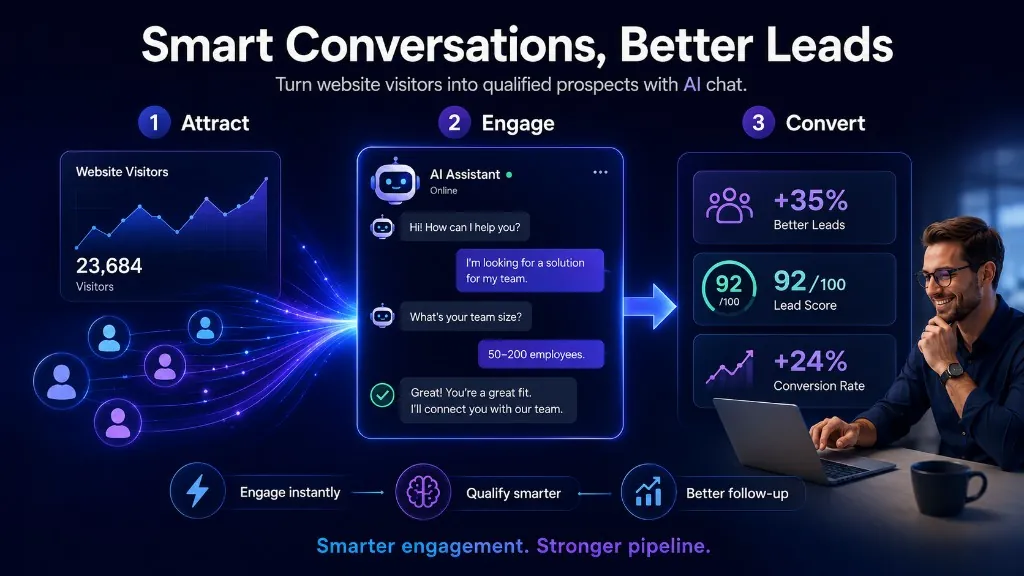
You spend money on traffic in the hopes that someone will convert, but most of the time, they disappear. What if you could create something that smartly and subtly engages visitors while helping you determine what needs to be followed up on? This is where the Jaano AI Chatbot —your helpful helper —can help.
Here, we will walk you through the process of creating a chatbot that converts website visitors into qualified leads. We'll discuss the how and why, and we'll provide actual data to support our claims. You'll leave with practical suggestions for creating or improving a chatbot that suits your needs.
Why a Smart Chatbot Is No Longer Optional
When a visitor lands on your website, chances are they’ll leave quickly if nothing engages them. According to data, many visitors will bounce without interaction. A well-designed chatbot allows you to capture attention, qualify interest, and automate follow-up without relying solely on human agents.
In fact, studies show that businesses using chatbots report website conversion boosts of 10–100%. (Leadoo - Conversion Platform) Also, in some industries, chatbot-driven conversion rates can reach 70%. (dashly.io) If you think your website chat widget is “just for support”, think again; it can be a lead engine.
But many chatbots don’t deliver. Reports indicate that, while the opportunity is enormous, many bots underperform due to poor conversation design or insufficient integration. (WorkHub) That means your chatbot strategy must be purposeful.
Defining What “Qualified Lead” Means for You
Before you build your chatbot, you must define what a “qualified lead” is for your business. Without that clarity, the chatbot might collect names and emails, but it won’t help your sales team.
Here are things to decide:
- Ideal customer profile (ICP) – industry, size, location, pain-points.
- What actions count – filling a form, booking a chat, downloading a guide.
- What signals you’ll look for – e.g., budget size, decision time-frame, authority.
- How your chatbot hands off to humans – when it’s a good fit, and when it’s not.
With those definitions in place, your Jaano AI Chatbot can ask the right questions, capture the correct data, and seamlessly pass the right leads to your team. Without them, you’ll end up with leads that aren’t really leads.
Conversation Flow That Feels Natural and Builds Trust
A chatbot must feel friendly, helpful, and low-risk. If it starts with “Hi, may I ask you 10 questions?” you’ll lose engagement. Instead, you want to design a conversation that:
- Welcomes gently and in your brand voice.
- Asks 1-2 broad, friendly questions to ease in.
- Gradually dives into more qualifying questions only if the visitor stays.
- Offers value: guidance, tips, next step, so it doesn’t just feel like a data collection tool.
- Provides an easy way to exit or reach a human so the visitor doesn’t feel trapped.
For example: “Hi there! I’m the Jaano AI Chatbot. I can help you determine whether our service is a good match and schedule a call. Would you like to start?” After a yes, you might ask: “Great! What brings you here today?” Then, depending on the answer, maybe: “How soon are you looking to move ahead?” or “Do you have a budget in mind yet?” etc.
Good conversation design keeps things engaging while gathering info that matters. It treats the visitor as a person, not a “lead number”.
Integrate Smart Qualification Logic
Once your chatbot flow feels friendly, you need logic that turns the conversation into a qualification. This means:
- Routing paths based on answers (e.g., if budget is low, it says “Thanks, let me send you a guide” rather than pushing for a call).
- Scoring leads: you might give points for "Has budget", "Decision-maker", "Ready timeline", etc.
- If the score is high, hand the lead to your team (CRM or alert). If low, nurture them.
- Capturing key data: name, email/phone, company (if B2B), need description, timeline.
- Integrating with your systems: CRM, email automation, and calendar scheduling.
By doing this, your Jaano AI Chatbot does more than chat; it separates those likely to convert from those who are just browsing. That saves your sales team time and increases focus.
Timing, Availability & First Response Matter
One of the most overlooked secrets: speed matters. If you wait to respond, you lose. Studies show: responding within 5 minutes can make you up to 100 times more likely to connect with a lead. (Blazeo) And with chatbots, you’re available 24/7 for basic questions, so you never miss the moment.
Because of this, your Jaano AI Chatbot should:
- Appear at the right moment (after the visitor shows interest, not immediately annoying).
- Offer real-time engagement; do not leave the visitor waiting.
- Trigger follow-up automation: e.g., send email, remind about a call, etc.
By being present at that crucial moment, you increase the chances of converting a visitor when their interest is highest.
Design for Good Data, Not Just Any Data
You might be tempted to ask lots of questions in the chatbot, but too many questions equal drop-offs. Instead:
- Ask the minimum required to assess qualification.
- Use branching logic so irrelevant questions don’t show up.
- Collect data you can act on: not just name + email, but timeframe, budget, decision-maker role, key challenge.
- Make it easy for the visitor, no long forms or friction.
When your chatbot captures the correct info, your sales team can follow up with context, making them more effective.
Usability Across Devices & Touchpoints
Visitors may arrive on desktop, mobile, or tablet devices. Your chatbot must work smoothly everywhere. That means:
- Mobile-friendly interface, quick responses.
- Clear chat widget placement and design.
- Consistent branding and tone.
- Works across entry points: website homepage, service pages, blog posts, landing pages.
A user who clicks from mobile and finds a clunky chat experience will bounce. A smooth experience builds trust.
Test, Measure & Iterate Continuously
A chatbot isn’t “set and forget”. To get good results, you must measure and improve. Here’s how:
Track engagement rate: how many visitors interact with the bot vs. ignore it. (Return On Now)
Track conversion rate: how many conversations turn into qualified leads.
Track lead quality: how many leads passed to sales actually convert.
Use data to refine: drop or rephrase questions that cause drop-off, adjust CTAs, and change the timing of bot appearance.
Use A/B testing: different welcome messages, different qualification logic, different offers.
| Metric | Typical Benchmark | What to Aim For | Note |
|---|---|---|---|
| Engagement rate | ~35-40% for basic bots (qualified.com) | 60-80% with strong design | More visitors interacting means more opportunities |
| Conversion to a qualified lead | Varied often under 10% if not optimized (WorkHub) | 20-40% or higher in good flows | Qualification logic is key |
| Response time | Minutes to hours if manual | Seconds if the chatbot is active | Faster responses = higher lead capture |
| Lead quality | Many leads are worthless if not filtered | High-fit leads handed to sales | Focus on fewer but better leads |
Voice, Tone & Brand Matching
Your chatbot needs to sound like you. If your website or brand voice is friendly and accessible, then the chatbot must reflect that. If you are more formal or technical, match that tone. A mismatch will confuse visitors or erode trust.
Also: the chatbot should disclose that it’s an assistant (“I’m the Jaano AI Chatbot”) and offer a human fallback (“Would you like to talk to a team member instead?”). This transparency helps build confidence.
Clear Call-to-Action and Next Steps
After qualifying a visitor, the chatbot must guide them to the next step: booking a meeting, getting a demo, downloading a PDF, or some other commitment. This CTA should be clear, simple, and tailored to the visitor’s stage.
For example: “Thanks! Based on what you told me, I see you’re ready to move in the next month. Shall I schedule a 15-minute call with our specialist this week?” This kind of CTA is stronger than “Submit”.
And then the chatbot must sync with your calendar and CRM so you don’t lose momentum.
Follow-Up and Lead-Nurture Integration
The conversation doesn’t end when the chat ends. Many leads need nurturing. Your chatbot should trigger follow-up workflows, such as an email sequence, SMS, retargeting, or another chat. If you ignore this, the visitor may slip away.
Good follow-up looks like: send an email within minutes summarising the chat and next steps, remind them if the meeting isn’t booked, and provide valuable content in the days that follow. This keeps the lead warm until the sales handover.
Practical Steps to Build Your Jaano AI Chatbot
Here’s a quick roadmap to get you started:
- Define your qualified lead criteria (who is a good lead).
- Map conversation flow: welcome → qualifier 1 → qualifier 2 → CTA.
- Choose platform & integrate with CRM/calendar.
- Write friendly scripts & design flows.
- Design UI for desktop + mobile.
- Launch to a small audience, test engagement.
- Measure and refine: engagement, conversion, quality.
- Scale: add triggers from different pages, refine CTAs, and segment leads.
- Update the chatbot regularly with new insights (questions, logic, offers).
- Train your team to follow up on leads passed by the chatbot quickly.
Final Thoughts
If you’re serious about turning website visitors into leads that your sales team wants to talk to, then you need more than just traffic. You need a system that engages, qualifies, and hands off with clarity. The Jaano AI Chatbot is not just a support widget; it can be your lead qualification engine.
By defining what a qualified lead means for you, designing a natural, friendly conversation flow, integrating smart logic, ensuring it works instantly, and building follow-up workflows, you’ll put yourself ahead of many businesses that still rely on forms and generic chat. The data backs this up: businesses implementing optimized chatbot flows see substantial improvements in conversions, lead quality, and sales results.
So take the next step. Map your ideal lead profile. Build your conversational script. Set your chatbot live. Test, learn, refine. With the right mindset and tools, your website visitors won’t just browse, they’ll engage, qualify, and convert.